SIGN UP FOR OUR
 Technology News
 Learn About The Digital Nomad Visa Option for Costa Rica
The long-awaited Digital Nomad visa option: Last year, the government announced the Digital Nomad visa option for legally staying past the traditional 90-day visa in Costa Rica. While, in principle, a viable option for those seeking to live and work virtually in Costa Rica for 1 or 2 years without having to do onerous border runs, the program, as initially announced, had flaws. It was left to thi...
 3DCR :The Best Cutting-Edge 3D Design Provider in Costa Rica
Costa Rica based cutting-edge provider of 3D design and rendering services 3D.CR (www.3D.CR) recently announced its expanded offering of dynamic 3D animations, walk-throughs, and fly-overs with the release of the new 2020 REEL summarizing the enhanced capabilities. For year's architectural 3D rendering is the smart, contemporary choice for developers, architects, designers, general contractors,...
 Costa Rica Will Host RightsCon 2020
The Ministry of Science, Technology and Telecommunications announced that Costa Rica will host the biggest human rights event in the digital era, RightsCon 2020. The announcement was made at the end of the RightsCon 2019 which took place in Tunisia with 2500 participants from 130 countries. “Back in October we presented the Digital Transformation Strategy towards the Costa Rica of the Bice...
 Costa Rican Social Security Service Receives UN Public Service Award 2019
Costa Rican Social Security Service “La Caja” (CCSS) received the United Nations’ Public Service Award 2019 in the category “Promoting digital transformation in public sector institutions”, Good Health and Well Being for the implementation of Single Digital Health Records, a unique tool in primary medical care. “The United Nations Public Service Awards is the most prestigious international rec...
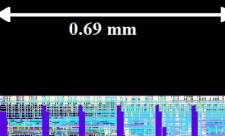 Costa Rica Creates First Microcontroller Completely Designed and Developed in the Country
The DCILab of the Electronic Engineering School at the Technological Institute of Costa Rica (TEC by its Spanish acronym), has created the first RISC, 32-bit microcontroller completely designed and developed in Costa Rica, for a microcircuit with medical applications. A microcontroller is a microprocessor which, in addition to its processing units, has input-output interfaces and dedicated unit...
 Could Hydrogen Power the Future of Costa Rica
By John McPhaul All the elements of a development of hydrogen energy in Costa Rica to power public transportation, trucks and even part of the electric energy grid have been invented and are proven technologies, now all that is missing is putting the elements together to sizably reduce Costa Rica’s carbon footprint, said Juan del Valle Gamboa, Director of Operations for Ad Astra, the Costa Rica...
 Costa Rica is the Most Social Media Friendly Country in Latin America
According to the Latinobarómetro Corporation, a non-profit public survey company located in Providencia, Chile, Costa Rica has the highest percentage of Facebook and WhatsApp users in Latin America. The study found that 77% of the population uses Facebook, while 83% uses WhatsApp. This percentage was much higher than in countries with larger populations. Costa Rica’s population is roughly 5 millio...
 Internet in Costa Rica Could be Slower this Weekend due to Maintenance Work of Submarine Cable
Internet service provided RACSA, subsidiary of ICE, informed that they will be performing maintenance work of the fiber optic submarine telecommunications cable system Maya-1 this weekend, March 1st through March 3, these works will take Maya-1 submarine cable out of operation. Previsions are being taken by using outbound Internet capacity through other Submarine Cable options so that affectati...
 11 National Parks in Costa Rica Will have Free Internet Service
As part of the project “Connected Public Spaces” the Ministry of Science and Technology (MICITT), the Ministry of Environment(MINAE) and the Telecommunication Superintendence (SUTEL) signed an agreement to offer free internet connection in Costa Rican National Parks. “Considering that Wildlife Protected Areas in the country are visited daily by hundreds of national and foreign tourists and ar...
 CINDE and Georgia Tech will Host Big Data Analytics Training in Costa Rica
The Costa Rican Investment Promotion Agency (CINDE) in collaboration with Georgia Tech will host a high dimensional and big data training that "will shape professional with basic knowledge in machine learning and programming to a more analytics-oriented profile" informed CINDE through a press release. The content includes functional data analysis methods, image data analysis, high-dimensional d...
 The Costa Rican Convention Center in San José Hosts the Life Sciences Forum 2018
For the fourth time, Costa Rica is the Latin American epicenter of technological convergence for life sciences. Ten international speakers will be analyzing the future of the technological manufacturing industry in the face of automation, artificial intelligence, new materials and virtualization. Organized by CINDE, the Costa Rican agency for promoting and attracting foreign direct investment t...
 Microsoft Will Relocate Costa Rica Operations to Technology City in San Jose
Microsoft is the first company that has confirmed it will be relocating its Costa Rica facilities to the “technological city” in San Jose, project that is being promoted by the Municipality of San Jose. Microsoft will be unifying its sales, operations and customer service business units and will install in a 21-floor tower that is being built in La Sabana, where the Universal store used to be....
 Nanotechnology Firm Inaugurates its Operations in Costa Rica
NOXTAK, a multinational firm specializing in nanotechnology for the control and mitigation of electromagnetic pollution from any source, has announced that it has chosen Costa Rica for setting up its operations. In the coming months, the company will start hiring personnel for manufacturing, design and engineering. At present, 11 employees are already working in the company’s administrative off...
 360° Sights of 76 Tourist Locations in Costa Rica Are Now Part of Google Special Collections
Google announced the arrival of its Special Collections to Costa Rica. This option is part of Google Maps, collects 360-degree sights of geographic, touristic, historical or cultural sites throughout the country. In total 76 locations are part of Google’s Special Collections in Costa Rica. “Thanks to the support of the country brand Essential COSTA RICA and different organizations, such as the ...
 Costa Rica Offers Attractive Conditions For Establishment of Shared Services Centers
Costa Rica continues to position itself as one of the most important destinations for the establishment of Shared Services for foreign and local companies. With the implementation of Robotics Process Automation (RPA) a form of business process automation technology the country takes close to 40% of the Latin American market competing with Brazil, regional leader in this technology, Mexico, Colo...
 Canadian Space Agency Provided $1.5 Million Funding for Ad Astra Rocket Costa Rica
Ad Astra Rocket Company lead by Costa Rican physicist, mechanical-engineer and former NASA astronaut, Franklin Chang, signed an agreement with Aethera Technologies Limited, and the Canadian Space Agency (CSA) to receive additional funding for the development of the VASIMR® engine. The financing of $1.5 million, “Provides a measure of Canada’s long-term vision of the importance of high-power ele...
 Costa Rica Ranks Third in Latin America in the Digital Readiness Index by Cisco
The Cisco Digital Readiness Index measured the digital preparation of 118 countries, 19 of which are from Latin America, with the purpose of learning where each country stands and the effects this generates in their competitiveness, generation of employment, attraction of investments and promotion of innovation. According to this Index, the country in Latin America best ranked in digital readin...
 Several Government Websites in Costa Rica Were Hacked
The Costa Rican government confirmed this Monday morning that several of their websites were hacked in an attack that apparently started on Sunday. All sites hacked have the extension go.cr and the total number of pages affected has not yet been confirmed. Some of the websites are already reestablished and working normally while others such as the pages of the municipalities of Puntarenas, Mati...
 Costa Rican Electricity Institute Spends $3.5 Million on 100 Electric Vehicles
The Costa Rican Electricity Institute (ICE) is replacing 100 vehicles that work with diesel or gas for electric cars. The cars purchased are 2018 Hyundai Ioniq EV's that will be used throughout the entire territory. The signing of the purchase for $3.5 million took place on Monday and the cars will be delivered within the next 5 months; funds came from a loan given by the Inter-American Develop...
 “EColones” Digital Platform in Costa Rica Offers Incentives For Recycling
Costa Rica has still a long road ahead when it comes to recycling practices, and a new digital platform hopes to help change this reality by offering “virtual money” that can be exchanged for discounts on products, services and experiences The way it works is simple, every time a user recycles they receive “virtual money” or credits, as they accumulate these credits they can opt for discounts...
 Amazon App Now Available for International Shopping and Shipping to Costa Rica
Amazon announced today through a press release that now purchases made by Costa Ricans through their online platform will be delivered directly to Costa Rica from the United States this includes electronics, books, clothes, shoes and toys, among others. The International Shopping experience has been enabled for Costa Rica within the Amazon Shopping application and It allows for purchasers to al...
 Kids 4-12 Years Old Can Register for Aerospace Engineering Course in Costa Rica
Engineering for Kids is a unique educational program in Costa Rica that works with international standards for the teaching of Science, Technology, Engineering and Math (S.T.E.M), and this time they have developed a program dedicated to Costa Rican Engineer and Astronaut Franklin Chang Diaz, designed to inspire the future aerospace engineers. The classes are targeted to kids 4-6 years old (Juni...
 Costa Rica Launches Its First Satellite Into Space with SpaceX
The first Central American satellite, developed by Costa Ricans will be launched the afternoon of this Monday, April 2 from the Cape Canaveral Air Force Station, Florida, USA. The rocket Space Falcon 9 and the Dragon spaceship will be in charge of the transportation of the small satellite, which was manufactured with CubeSat technology, and consists on a cube that measures only 10 centimeters (...
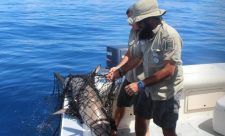 Modern Technology Allows Coast Guard to Detect Illegal Activities of Foreign Vessels in Costa Rican Waters
The non-governmental organization Conservación Internacional (International Conservation) and the National Coast Guard Service in Costa Rica carried out a joint study from April 2016 through September 2017 in which they monitored foreign vessels that traveled through the exclusive economic zone of the Costa Rican Pacific. The objective of this operation is to detect any illegal activities that ...
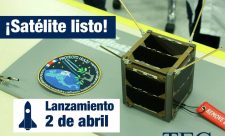 First Costa Rican Satellite will be Launched April 2
Costa Rica will launch on April 2 its first satellite to the International Space Station from Cape Canaveral, Florida, U.S.A. This initiative known as Irazu Project (Space Technology for the Monitoring of Climate Change), is the result of the work of the Central American Association of Aeronautics and Space )CAAE for its Spanish acronym) and the Costa Rica Technology Institute (ITCR) with the s...
 Steganography and the Alleged Trump Sex Tape
Earlier this year, a report published by The New York Times suggested that United States intelligence officers interacted with a Russian spy who offered two interesting things: powerful hacking tools stolen from the National Security Agency and a “sex tape” purportedly showing President Donald Trump cavorting with prostitutes at a Moscow hotel room in 2013. What is even more interesting than th...
 The Challenges of Building Your Dream Home in Costa Rica
Several years ago, I accepted the challenge to construct a large custom home high on a mountain in one of Costa Rica’s jungles, and this project turned out to be the most challenging project during my thirty-five years of construction experience. To begin the construction, I needed to locate the boundaries for the foundation of the house, based on the construction plans provided by an architect...
 ICE Costa Rica Will Increase Speed in Mobile Network to 4.5G this January
The Costa Rica Electricity Institute (ICE) through its commercial brand Kolbi, will begin offering this January mobile telephone networ service of 4.5G, with capacity of up to 200Mbps as part of its strategy to stay up to date with the latest technology and compete with companies like Claro and Movistar. In areas were 4G network is available right now, the upload and download speeds in theory ...
 Technological Evolution Demands Changes of the Costa Rican Education System
Is the Costa Rican educational system ready to respond to technological evolution, automation, artificial intelligence and other disruptive megatrends that are changing the world and the jobs of the future? More than 250 representatives of the Costa Rican government authorities, academy, private sector, chambers, pro-development organizations, education experts, presidential candidates and other r...
 Costa Ricans Will Have Electronic Passport by 2020
The electronic passport for Costa Rican citizens is a country project that will soon be put up for open tender with the expectation of having it ready by 2020. With this technology migratory procedures will be done almost automatically through smart doors that will have systems to run fingerprints and facial recognition and will avoid having to spend time in long lines at the regular counters. ...
 Costa Rica’s Broadband Market is the Most Developed in Central America
According to a report by ReportLinker Costa Rica's liberalised telecom sector has seen substantial growth in all sectors in recent years. Although competition was slow to develop there is now effective competition in all sectors. The state owned operator ICE remains the dominant provider of fixed-line services, while the regional operators Claro and Movistar are significant players in the importan...
 WebCongress Digital Marketing Event Takes Place in Costa Rica November 16-17
The 37th edition of WebCongress will be held in San José, Costa Rica on November 16 and November 17 at the National Auditorium. This event which provides information on the latest digital marketing trends and strategies is regarded as one of the most important digital marketing events in the world and is offers conferences by experts in the industry from renown companies such as Facebook, Link...
 Visualization Portal for Genetic Variation – Created by Costa Ricans Featured in Oxford University Magazine
The Bioinformatics Magazine of Oxford University regarded as the most important in the field of bioinformatics published this week details on a tool developed by Costa Rican scientists. The visualization portal for genetic variation (VizGVar) is a tool for interactive visualization of SNPs and somatic mutations in exons, genes and protein domains; in other words, it helps visualize the pattern...
 Costa Rica’s First Satellite Travels to Japan for Tests Prior to 2018 Launch
The first space satellite developed in Costa Rica is a 10 cubic centimeter aluminum affair that weighs one kilogram. The milestone achievement was designed using the CubeSat picosatellites model - very small, lightweight and low-cost devices. The satellite will carry a computer, a communication system and a power system. It will also have solar panels and a secondary computer. When it arr...
 Facebook Goes Down and the Virtual Community in Costa Rica and the World Turns to Twitter to Vent
No, it wasn’t your phone, it wasn’t your computer or your Internet provider, Facebook actually went down, and the virtual community in Costa Rica and around the world didn’t know how to react for a while, until, they turned to Twitter. Since about 9:30 a.m. Costa Rica time, both the Facebook site and the App are failing to load in what is apparently a global crash of their system; when you go ...
 Costa Rican Train Riders Can Get Up-to-the-Minute Mobile Updates
The Costa Rican Railways Institute (Instituto Costarricense de Ferrocarrile, INCOFER) and the Ministry of Public Works and Transport (MOPT) have made available to the public a mobile phone application called "Incofer Móvil" with alerts on changes in train service and delays. The app also includes train schedules on the urban routes that connect Belén, Heredia, Alajuela and Cartago with San Jos...
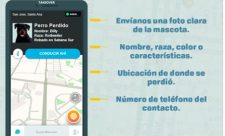 Help Locate Lost pets in Costa Rica Through Waze
If you commonly use Waze in Costa Rica to find your way around or try to avoid heavy traffic now you can also help find lost pets while using this app. This option for the time being is only in its testing phase, it will function for 8 months and if the results are satisfactory it will remain available. How does it work? Simple, if someone losses his/her dog or cat all they need to do is sen...
 iPhone 8 Will be Available in Costa Rica This October While for iPhone X Ticos Will Have to Wait Until end of December
Apple recently announces the launching of new smartphones, which include the iPhone 8 and 8Plus, the iPhone X in commemoration of the 10 years of iPhone and the third generation of Apple Watch. The iPhone 8 and 8 plus will arrive to Costa Rica in the month of October and will be available for sale at the iCon stores and Claro Costa Rica offices, while Movistar and Kölbi have not confirmed the d...
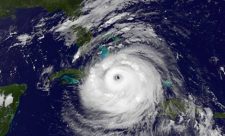 Internet Services in Costa Rica Could Suffer Interruptions This Weekend due to Irma
As Hurricane Irma approaches Florida, Costa Rica Internet service providers have warned that the service could suffer interruptions this weekend since several data centers are based in Florida. Companies Tigo and Cabletica have already notified clients through their social media accounts: “We would like to inform you that due to the pass of Hurricane Irma through Florida, USA, some of our se...
 Costa Rican Video Game Companies Take Part of External Development Summit in Canada
Fair Play Labs, Journey Animation and Headless Chicken Games are three Costa Rican videogames companies that are participating in the External Development Summit (XDS) that is taking place in Vancouver, Canada. “The External Development Summit is the only annual international games industry event held in Canada with a primary focus on external development of art, animation, audio, software engi...